Go GORM 1:N (One To Many) relationship modeling and queries
In this post we’ll cover how to model a one-to-many relationship and how to query it using GORM.
A one-to-many relationship can describe relationships like parent and child, company and employee, or school and student — think of a school that can have many students while each student belongs to only one school.
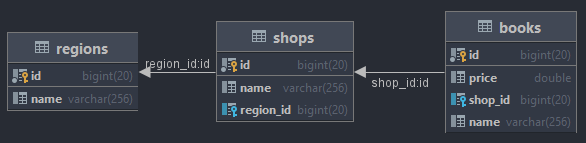
As a very simple example, we’ll create tables with the relationship Book → Shop → Region.
First, let’s do some very simple modeling.
package models

type Region struct {
    ID int
    Name string
    Shops []Shop
}

type Shop struct {
    ID int
    Name string
    RegionID int
    Books []Book
}

type Book struct {
    ID int
    Name string
    Price float64
    ShopID int
}
I’ll be using MySQL. Create a database called book_store and run the code below to create the tables.
package main

import (
	"github.com/sanghee911/bookstore/backend/src/models"
	"gorm.io/driver/mysql"
	"gorm.io/gorm"
)

var DB *gorm.DB

func Connect() {
	var err error
	DB, err = gorm.Open(mysql.New(mysql.Config{
		DSN:                       "root:root123@tcp(dev-server:3306)/book_store?charset=utf8mb4&parseTime=True&loc=Local",
		DefaultStringSize:         256,
		DisableDatetimePrecision:  true,
	}), &gorm.Config{})

	if err != nil {
		panic("Could not connect to the database!")
	}
}

func AutoMigrate() {
	err := DB.AutoMigrate(
		&models.Region{}, &models.Shop{}, &models.Book{},
	)

	if err != nil {
		panic(err)
	}
}

func main() {
	Connect()
	AutoMigrate()
}
The following tables were created in the database. At a glance you can see the relationships among the three tables.
Now let’s save some data.
package main

import (
	"github.com/sanghee911/bookstore/backend/src/models"
	"gorm.io/driver/mysql"
	"gorm.io/gorm"
)

var DB *gorm.DB

func Connect() {
	var err error
	DB, err = gorm.Open(mysql.New(mysql.Config{
		DSN:                       "root:root123@tcp(dev-server:3306)/book_store?charset=utf8mb4&parseTime=True&loc=Local",
		DefaultStringSize:         256,
		DisableDatetimePrecision:  true,
	}), &gorm.Config{})

	if err != nil {
		panic("Could not connect to the database!")
	}
}

func AutoMigrate() {
	err := DB.AutoMigrate(
		&models.Region{}, &models.Shop{}, &models.Book{},
	)

	if err != nil {
		panic(err)
	}
}

func main() {
	Connect()
	AutoMigrate()
}
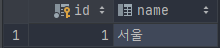
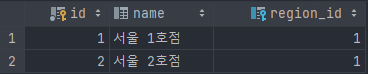
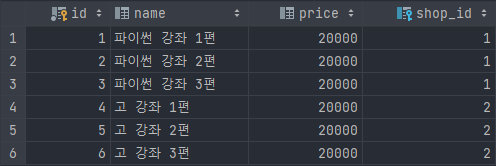
The data is saved into each table, and you can see that region_id and shop_id, used as foreign keys, were automatically saved.
To join the tables and output data with SQL, use the JOIN command.
select r.name as regionName, s.name as shopName, b.name as bookName from regions r join shops s on r.id = s.region_id join books b on s.id = b.shop_id;This produces the table output below.
Now let’s join the same tables and output them using GORM’s Preload method.
package main
import (
"bytes"
"encoding/json"
"fmt"
"github.com/sanghee911/bookstore/backend/src/models"
"gorm.io/driver/mysql"
"gorm.io/gorm"
"log"
)
func main() {
dsn := "root:root123@tcp(dev-server:3306)/book_store?charset=utf8mb4&parseTime=True&loc=Local"
db, err := gorm.Open(mysql.New(mysql.Config{
DSN: dsn,
}), &gorm.Config{})
if err != nil {
log.Fatal(err)
}
var region models.Region
db.Preload("Shops.Books").First(®ion)
data, _ := json.Marshal(region)
var prettyJSON bytes.Buffer
_ = json.Indent(&prettyJSON, data, "", "\t")
fmt.Println(prettyJSON.String())
}The result is output as JSON as below.
{
	"ID": 1,
	"Name": "Seoul",
	"Shops": [
		{
			"ID": 1,
			"Name": "Seoul Branch 1",
			"RegionID": 1,
			"Books": [
				{
					"ID": 1,
					"Name": "Python Course Vol. 1",
					"Price": 20000,
					"ShopID": 1
				},
				{
					"ID": 2,
					"Name": "Python Course Vol. 2",
					"Price": 20000,
					"ShopID": 1
				},
				{
					"ID": 3,
					"Name": "Python Course Vol. 3",
					"Price": 20000,
					"ShopID": 1
				}
			]
		},
		{
			"ID": 2,
			"Name": "Seoul Branch 2",
			"RegionID": 1,
			"Books": [
				{
					"ID": 4,
					"Name": "Go Course Vol. 1",
					"Price": 20000,
					"ShopID": 2
				},
				{
					"ID": 5,
					"Name": "Go Course Vol. 2",
					"Price": 20000,
					"ShopID": 2
				},
				{
					"ID": 6,
					"Name": "Go Course Vol. 3",
					"Price": 20000,
					"ShopID": 2
				}
			]
		}
	]
}
The tables joined fine, but the data isn’t in the same shape we got from the SQL above. Let’s try using SELECT, as we did in the SQL query.
package main

import (
	"bytes"
	"encoding/json"
	"fmt"
	"gorm.io/driver/mysql"
	"gorm.io/gorm"
	"log"
)

type Result struct {
	RegionName string
	ShopName string
	BookName string
}

func main() {
	dsn := "root:root123@tcp(dev-server:3306)/book_store?charset=utf8mb4&parseTime=True&loc=Local"
	db, err := gorm.Open(mysql.New(mysql.Config{
		DSN: dsn,
	}), &gorm.Config{})

	if err != nil {
		log.Fatal(err)
	}

	var results []Result

	db.Table("regions").
		Select("regions.name as RegionName, shops.name as ShopName, books.name as BookName").
		Joins("join shops on shops.region_id = regions.id join books on books.shop_id = shops.id").
		Scan(&results)
	data, _ := json.Marshal(results)
	var prettyJSON bytes.Buffer
	_ = json.Indent(&prettyJSON, data, "", "\t")
	fmt.Println(prettyJSON.String())
}
The output now matches the data we got from running the SQL.
[
	{
		"RegionName": "Seoul",
		"ShopName": "Seoul Branch 1",
		"BookName": "Python Course Vol. 1"
	},
	{
		"RegionName": "Seoul",
		"ShopName": "Seoul Branch 1",
		"BookName": "Python Course Vol. 2"
	},
	{
		"RegionName": "Seoul",
		"ShopName": "Seoul Branch 1",
		"BookName": "Python Course Vol. 3"
	},
	{
		"RegionName": "Seoul",
		"ShopName": "Seoul Branch 2",
		"BookName": "Go Course Vol. 1"
	},
	{
		"RegionName": "Seoul",
		"ShopName": "Seoul Branch 2",
		"BookName": "Go Course Vol. 2"
	},
	{
		"RegionName": "Seoul",
		"ShopName": "Seoul Branch 2",
		"BookName": "Go Course Vol. 3"
	}
]
A future post will cover modeling and querying 1:1 and N:N relationships as well.